My Background
During the summer of 2007 I was a Home Theater product specialist working at a chain store location. Prior to that job, I was employed at several other Consumer Electronics stores doing the same thing. This post is here not only because I am frustrated with customers returning HDTVs for the wrong reason (e.g. "the picture doesn't look as good as it does in the store", when it could be remedied through simple solutions), but because people are misusing their HDTVs even when they keep them.
I hope this blog benefits you more than a trip to your local B&M store where the average employee isn't knowledgeable and honest enough to answer things with enough depth but more importantly candor. I have created a series of blogs. I know that this guide is not the most in-depth guide available but I have tailored this towards the average laymen so that they can learn the most they can without the biggest investment in time. Nonetheless, I hope your readings here can enlighten you about the basics of HDTVs and to allow you to make informed decisions not just in TVs, but with the accessories and warranties that oh so often associated with buying TVs.
........................................................................................................................................................................
First off, HDTVs aren't right for everyone. If you plan on watching HDTV, know that only HD will look good on the TV.
If you plan on using basic cable on your HDTV, and only that, save yourself the grief of being disappointed with the lackluster performance of non-HD signals on HDTVs; it would be best to stick to traditional tube TVs if you just plan on watching non-HD programming.
Secondly, just because you have an HDTV doesn't mean that you are watching HD programming.
Having a HDTV in our day and age is like having a color TV during the late '60s. Sure you can have a color TV, but if the show is only in black & white the picture you get will only be black in white. Same goes for HDTVs...sure you have a HDTV but if what you are watching is not HD, then the picture you get won't be HD (which is usually a unrefined, slightly grainy picture that doesn't take up the whole screen...more on that later)
Most consumers who don't know enough about HDTVs think that they are watching HD when in fact they are watching an ugly basic cable channel stretched out to fill the screen. HDTVs are no longer simple plug-and-play devices - one has to make sure you have the right cables, among other things, to get a good picture. Which goes to my next point...
To get a good picture like you see at the store, you must have the 3 Essential Elements:
- a HDTV set
- a HDTV Source/Service (e.g. HD Cable, HD satellite, or "HD Antenna")
- HDTV Cable Connections (e.g. HDMI Cables, Component Cables, or DVI Cables)
Using the Yellow, Red, White A/V Cables (also known as the Composite Cables) on your TV is a taboo. These cables are old, analog A/V cables that worked fine for your old tube TV but won't work well for your new HD set. The picture you will get from these cables will be blocky, soft, and just darn distasteful. This brings me to my next point, use High Definition cables whenever you can, meaning HDMI or Component Cables (the Green, Blue, and Red Cables, which acts as a replacement to the traditional yellow one). If you are missing even one of the listed 3 elements above, expect to see a grainy, not so great picture on your screen. The following is a breakdown of what you should do to implement the "Essential 3 Elements" rule.
1) Upgrade your satellite or cable service to HD
Like I've said earlier, basic cable and even non-HD digital satellite looks unimpressive on your new HDTV. You should upgrade to HD to get the best out of your set. It'll cost $10-15 extra a month, but if you don't plan on watching HD on your HDTV, why did you buy your new TV in the first place? Because it's flat and looks cool?!? If you aren't upgrading because of the additional cost or if you are using an antenna on your old TV right now, please read on...
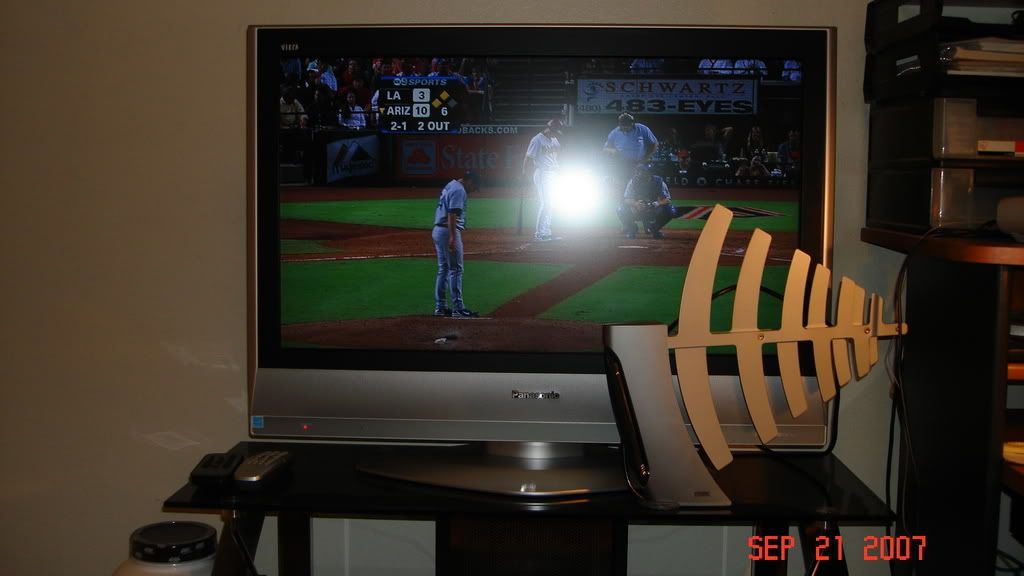
2) Get an antenna to take advantage of over-the-air digital channels - THINK FREE HD CHANNELS!!
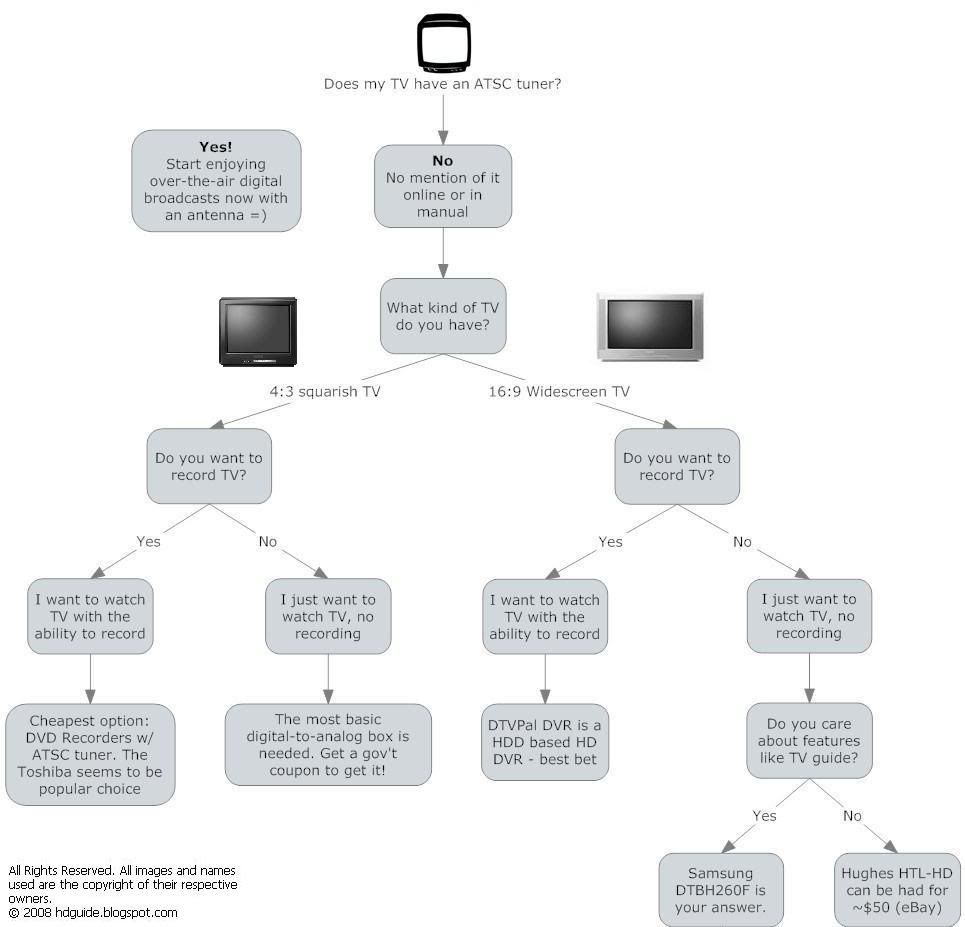
Most of the TVs being manufactured since 2006 are made with what they call digital tuners (sometimes interchangeably used with the terms ATSC tuner and HD Tuner). An ATSC tuner allows you to pick up your local digital channels for free simply by plugging in an antenna into the back of the TV. If your TV's manual doesn't say anything about an ATSC Tuner, if it is labeled HD-Ready (as opposed to HD Integrated), or labeled HDTV Monitor then you would need a HD Terrestrial Set-top Box. These aren't that easy to come by but if you look around at your local B&M stores you would have to ask them to check the stock in their system.
Digital channels in this sense mean crystal clear channels that aren't prone to traditional snowy pictures you get with an antenna back in the day. Some digital channels are even HD, meaning they are naturally widescreen (will take up the whole screen) and look extra sharp. Using an antenna to watch local HD programming will give you the best picture quality even when you are comparing it with the picture you would get on HD Sattelite and Cable - the reason for this is that the satellite and cable companies usually compress their HD signals alot when they transmit it to your household. With over-the-air broadcasting, the stations compress their video stream less, resulting in a better picture and sound.
Numbering conventions for digital channels is comprised of the channel number in addition to a hyphenated suffix number e.g. Ch 11 is numbered 11-1.
KNBC 4-1 non-HD "1 vs 100" via antenna, notice sidebars for non-HD shows
KCAL 9-1 Dodgers Game in HD via antenna
KVEA 52-1 Telemundo HD News Programming via antenna
*NOTE - You're probably going to notice online and at stores that the antennas they sell nowadays are labeled HDTV Antennas. HDTV labeling on antennas is a marketing ploy...any kind of antenna can pick up digital (HD) signals. The only reason they mark them HDTV Antennas is so you will know the antenna will be able to pick up HD. More importantly, HDTV labeling on antennas is about making money and tricking the consumer into thinking HD antennas are different from regular antennas, which isn't the case.
3) Upgrade your DVD Player
Your old 3 year DVD player won't look that great on your new HD set, unless it is an extremely good Progressive Scan DVD Player ($100+ when you bought it). Unless you have one of those, you have to get an HD Upconverting DVD player to get the best possible picture out of your TV, and be sure to buy an HDMI cable with it since its not included. HD Upconversion is a feature that transforms your regular DVD into an HD signal, thereby making the image look better on your TV. Be sure not to buy cables from your local B&M store as the markups for their accessories are ridiculous.
Well that's it for now. If you have any questions feel free to check out the FAQs. If you don't find anything that helps you there, feel free to post a comment here and I'll try my best to answer you as soon as I can. Take care now, hope this was helpful in your search for an HDTV or for simply hooking it up. Until then, ciao. Also, I am a poor college student with a 16 unit course load and an unpaid internship....if you guys could help me out and this cause, feel free to send on donation there on the left =).
Again, take care.
Friday, September 21, 2007
Easy & Honest Guide to HDTVs
Misc Things to know about HDTVs
Facts about HD Programming
Sometimes you will get black bars on the side of the TV even when watching HD programming....GET OVER IT. Not everything is filmed in HD, even if you are watching an HD channel. For example, let's I'm watching Grey's Anatomy in HD on ABC (either thru HD Cable Service or an antenna using my TV's ATSC Tuner). When it turns to commercials, some commercials will not be in HD so what you'll get is a square image and black bars on the side. DON'T TRY TO ADJUST the picture so that you get rid of the black bars! They're just damn commercials. By the time you adjust the picture, you will forget to readjust the picture when the HD show comes back from commercials.
A majority of HD programming on the major networks are usually aired during the morning (e.g. morning shows) and night (e.g. primetime shows). Everything else will have black bars on the side. "Well I have an HDTV, so shouldn't everything be in HD" Well if you owned a color TV back in the early 60's, did that mean that everything you got was in color? NO. If a program wasn't available in color, it would play in black and white even if your TV was capable of producing color. Same argument can be made about HDTVs - if the programming isn't HD, it won't be in HD even if your set is capable of being in HD. Progress is being made for syndicated shows in HD. Two and a Half Men, Hour of Power, Jeopardy, Wheel of Fortune, and Comics Unleashed are among some syndicated shows that are filmed and usually aired in HD by local affiliates, though its ultimately up to your local affiliates what they buy in HD.
Hooking up your TV isn't hard. Simply match the colors! - Sometimes I wonder if people like the attention of being so stupid. How hard is it to match the green, blue, and red cables from the DVD player to the back of the TV? Repeat for cable box, game console, and your done. It's even easier when you use an HDMI Cable, it's just one cable for audio and video. All it takes is patience with looking at the user manual. Gosh....
What's the best cable I could use for my TV? Here's the cable hierarchy:
HDMI (Looks like USB) > Component Cables (Green, Blue, Red) > S-Video > Composite (Yellow)
If your DVD player, cable box, game console, etc has an HDMI output, use that instead of the yellow composite cable. If HDMI is not available on your unit, check to see if it has component output on it (green, blue, and red plugs) and use those instead. HDMI and Component cable interfaces provide your TV with the best signal possible since they are both capable of transmitting HD resolution. S-Video and Composite cables are not HD connections and using those when you can use HDMI or Component cable connections will result in a grainy picture with only a fraction of detail an HD source has. HDMI in theory should be better than Component since HDMI transmits its signal digitally while Component does the same job using an analog signal. In practice, however, HDMI only gives you a slight amount of extra detail which would most likely be discernible to some. The advantage of HDMI is that it does help keep cable clutter down since its slender design transmit both high quality video and sound in one simple cable.
Guard yourself against the Peer Influence e.g. What your not-so-knowledgeable neighbor Jim said
Peer influence is one of the greatest things that drive people to do stuff. Because of the lack of knowledge typical consumers have, they say things that aren't necessarily true, some are even myths. Don't always listen to what your friends and neighbor say. "Oh honey, we don't want to go with plasma because Jim said that plasmas go out in 5 years." or "Oh honey, we don't want that Pioneer 720p plasma because its only 720p. Let's get the Vizio 1080p LCD because it has higher resolution." Your neighbor Jim might act like he knows a little especially if he became a recently new owner of a HDTV, but he's basically spewing to you the dumb-downed version of stuff that the kid at BB or CC told him, and even that info in itself isn't that great. Resolution isn't everything.
FAQs
Could you please explain why non-HDTV programming (air, cable or DVD) looks worse on HDTV's than on a regular CRT?
The answer lies in the nature of flat-panel technology (e.g. LCDs/Plasma). Images on LCDs and plasmas are made up of small dots that are fixed on the screen called pixels. The number of pixels on those TVs are indicated by the native resolution of the TV - usually it is 1366x768 on most LCDs and Plasmas (these are called 720p models), 1920x1080 on higher LCDs and Plasmas (these are called 1080p models), and on sometimes you get weird TVs that have wacky resolutions like Hitachi's 1024x1080, or 42" plasma's 1024x768. Generally the more pixels on the screen, the better the image is, depending on the brand of the TV of course. Anyways, I digress...
Basic cable channels run on 480i signals, which means that it only has 480 lines of video resolution. Now HDTVs have at least 768 lines of resolution. Try to think of a 480i signal as a 4x6 picture and the HDTV as a 8x10 frame - the picture simply wont fit not only because it is too small, but because the 4x6 picture isn't the same proportion to the 8x10 frame! The only way to fit that 4x6 picture onto the frame is to blow the picture up so that it becomes a the same size of of the 8x10 frame. The processing in which the 4x6 picture becomes a 8x10 will only seek to make the image woese (how can you possibly make a blownup version of a 4x6 picture look as good as the original....the answer is you can't. That's why cable programming looks bad on HDTVs.
So if you are feeding your TV a small resolution signal (e.g. 480i from basic cable, or 480p from a progressive scan DVD player), the image won't look that great. If you feed it a signal that is close to its native resolution of 720p or 1080p, e.g. 720p or 1080i signals, then it will look fine.
That answers why basic cable looks like crap on HD sets. Now to the reason basic cable can still look good on a tube. A tube TV has a series of ray guns in its back that provides you with the picture you see on the screen. The screen on the tube TVs don't have fixed, physical pixels on it. In fact, the tube TV ray guns can display exactly what you feed it. For example, if you feed your tube a 480i basic cable channel, it will display all 480 lines without having to blow up the image to fit 768 lines like an HDTV. This is a rather crude explanation, but I'm sure you can find a better one on Cnet.com. One way to think of it is that a tube playing basic cable is using a magnifying glass to blow up an image; there is practically no distortion. On the other hand, if you try to blow it up with an HDTV, think of yourself copying and pasting the same image from before onto MS Word and dragging the arrows to make the image bigger, it simply looks bad. Both can blow an image up to a certain size, it's just that tubes can do them better than flat-panels.
720p vs 1080p, which one should I get?
If you had the choice between a name-brand 720p or budget brand 1080p TV, go for the name-brand one. Things like contrast ratio and overall picture should be the deciding factor, not simply just the pixel count. And if your friend sees you owning a brand-name 720p TV and says something about how you should have gotten a budget brand 1080p one instead, tell him to go blow himself. It's peer influence coming from dumb people like that that make the average joe consumer make poor buying decisions. The benefits of 1080p are usually only noticed when you are sitting close to the screen and/or the television is big (50"+).
Should I get a Blu-Ray HD Player, an HD-DVD Player, or a HD VMD Player?
There is a format war going on that will replace regular DVDs in the coming years - High Definition DVDs. Before there were only 2 major formats duking it out, Blu-Ray and HD-DVD, but there has been a recent development HD VMD. I'm not going to explain all the technicalities of all three different formats here, as it would be too long, but my advice to you coming as a consumer is to hold off on a next generation HD player. Proponents of Blu-Ray are touting higher storage capacity and better movie selections but the HD DVD Camp and the new HD VMD format are touting lower prices on their players. My professional and personal opinion is to hold off on a next-gen player until the dust settles.
Buying Guide - What NOT to buy at your local Electronics stores
With prices of TVs and DVD players going down, electronic stores have, for the past few years, expanding their profiting outlook by upselling accessories at ludicrous markups. Below is a list of things you shouldn't buy at your local B&M electronics store. By foregoing paying ludicrous prices on accessories at these stores, you can find much cheaper yet comparable equivalents online. Please read on to find out more...
Cables
Markups for most computer and TV accessories are excessive....we are talking 80-200%. About a couple years ago stores started marking up cable prices, justifying their actions by saying that cables are essential to the picture quality of your TV. True, cables are important but paying $80+ for a video cable is ridiculous, especially if you need a couple of them (I guess if theres a way to make money, they do it)? Monoprice.com and other websites offer cable accessories of the comparable quality for significantly lower prices. For those who tout retail warehouse membership, you can get decent deals on cables as well, though not as cheaply as you can on Monoprice.
Warranties (consider only if your brand is a budget brand)
Most extended warranties your B&M stores sell nowadays aren't actual extended. Most of them nowadays supersede the manufacturer warranties, meaning if anything was to go wrong with your product during year 1, you can go back to where you bought the item and try to have them fix. That isn't so bad in itself, in fact it can be more convenient since they usually are quicker than what the manufacturer process would put you through. The fact is that your product was made to last at least a year, or however long the original warranty would have covered, so by having the manufacturer cover the first year is them taking on less of a burden. Whereas a 3-year extended would have given you a total of 4 years product protection, a 3-year warranty would only give you 2 years in addition what you would have originally had.
The good name brand TVs malfunction less than the budget ones; I draw this conclusion based on what I see returned at stores. My friend got a Proview at Costco and it went out in couple months, I myself once owned a Polaroid and it wouldn't stop giving off this electronic burning smell (aka new TV smell) for months. I eventually went through the manufacturer's outsourced Warranty service in Canada, Prima Worldwide was what it was called, and after many angry messages left on the supervisor's machine, I got a swap-out replacement at the original store I purchased my TV at, but not without a lot of hassle and 2+ months of waiting. The warranties provided by Worst Buy are actually reasonably priced, and Circuit Sheety has a very comprehensive and fair protection plan. So consider it if it's a cheap TV, but don't if its something well known like Sony or Panasonic because you're more likely than not never going to use it.
Surge Protectors
I honestly don't know as much as I should about surge protectors, but if a $25 one has a guaranteed $10,000 insurance policy on it, why would you pass that up for a $300 fancy surge protector. To my knowledge, a fancy surge protector won't significantly boost the performance of any of your electronic components. So long as a cheap surge protector has a good guaranteed (some will only replace the surge protector and will only cover damaged merchandise at their discretion), go for the cheaper ones.
Wall Mounts
Markup for these things are pretty high as well, and its really hard to find a place that sells them with a low profit margin. Luckily for us Man invented Costco and Monoprice.com.
***TIP*** Free Extended Warranty & Accidents Protection
Something the common consumer doesn't know is that most Platinum and even gold level credit cards will double the warranty of your merchandise up to a year. Read more on this on the website of your Credit Card company to find out details and if this is applicable to you.